What is the Famora app?

Famora is built as end-to-end family location and coordination software. When caring for teens, ageing relatives, or your whole household matters, Famora translates raw handset signals into a shared map plus timely, meaningful alerts — not clutter.

The in-app mobile experience

The UI is optimised for thumb reach and quick navigation: live map view, roster of members, recent alerts, and account settings remain clearly separated. Smart notification management means alerts fire for the journeys or zones you configure — helping battery life stay predictable and interruptions stay intentional.

Fitting into everyday life

School pickups, commute windows, or long-distance travel become easier when you can reconcile plans with Famora's instant updates plus historical route summaries. Using geofencing, you can mark places that deserve automatic arrivals and departures (exact capabilities depend on the shipping release notes).

What Famora excels at

We focus on clarity over gimmicks — doubling down on the workflows families genuinely rely on for safety and scheduling.

Core

Live sharing & map

Browse current locations on one map — zoom in, spotlight a member, and follow breadcrumbs that read well on pocket-sized canvases. Update cadence honours both device prompts and granular in-product controls.

Past

Location history

Dig into same-day timelines or selectable ranges for reassurance, planning, and healthy transparency.

Alerts

Smart notifications

Push only for the moments you care about — categories and frequency are adjustable in settings.

Privacy

Permission & sharing control

OS-native permission flows. Any surface area you stop sharing is reflected quickly for the rest of the circle.

Family

Circles, roles & invites

Invite via link or codes, designate admins vs regular members depending on roadmap delivery.

Performance

Efficient syncing

Famora batches background work thoughtfully so needless GPS pings are avoided. Owners of both Android and iOS hardware should notice steadier-than-average battery envelopes during daily commutes.

Product screenshots

See how realtime tracking and granular history coexist — optimised for readability on small glass while still feeling trustworthy.

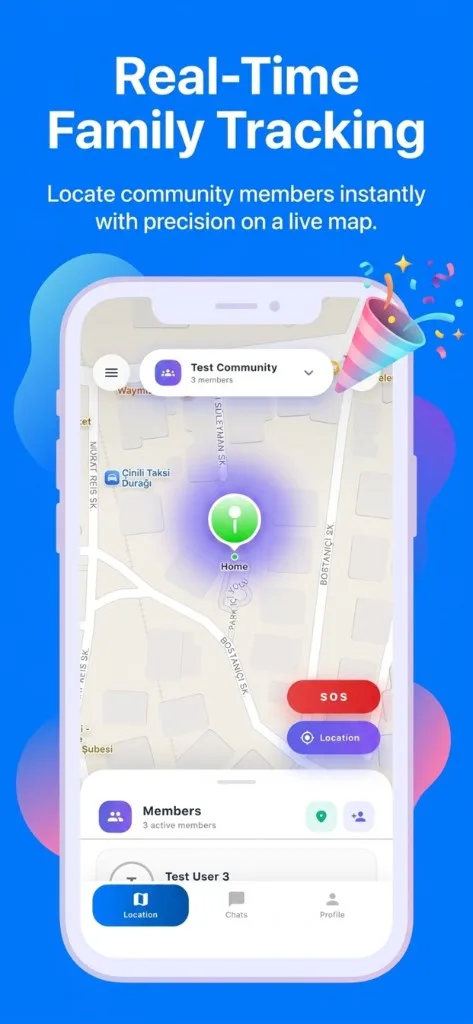
Famora realtime map scene with SOS shortcut, compass actions, bottom navigation
Realtime map — community switcher plus member chips rendered over Apple-style cartography samples.
Famora location history with playback scrubber at 1x 2x 4x speeds and chronological log sheet
Route history UI — filters, transport-style playback speeds, and a scrollable breadcrumb ledger.

Designed for households like yours

Stories drive defaults — here are personas we optimise onboarding and smart defaults toward.

Parents & extended families

Coordinate extracurricular pickups, babysitter hand-offs, or emergency relays without endless texts.

Multi-generational homes

Keep ageing relatives confidently independent while offering gentle check-ins and shared visibility.

Frequent travellers

Bridge time zones — confirm arrivals, summarise daily movement, and sleep easier while someone is abroad.

Getting started in three steps

Most families reach their first shared map moments after finishing store install.

  1. Install Famora

    Grab the build from the App Store or Google Play, then authenticate your account.

  2. Create your circle

    Invite members through deep links or short codes — assign aliases and stewardship roles upfront.

  3. Calibrate permissions

    Finish OS prompts, then tune safe zones and alert thresholds from in-app toggles.

Security, privacy & account integrity

Household location stories are highly sensitive. Famora therefore defaults to minimum necessary sharing: services gate data through sessions and authorisation layers, with optional step-up authentication on capable devices (biometric unlock continuity where supported).

  • JWT-style secure API sessions matching your backend posture
  • Explicit permission prompts plus plain-language privacy toggles
  • Transparent account & device management surfaces

Read our Privacy Policy and Terms of Use for data processing and service rules. Mirror those URLs inside your store listings for strongest user trust.

Frequently asked questions

Ground-truth answers about Famora's family safety app positioning.

Which platforms does Famora support?

Famora is designed for iPhones via the Apple App Store and for Android phones via Google Play.

Can location sharing work without user consent?

No. Location and notification sharing depends on OS-level permissions. Famora is designed for clear prompts and revocable access when you disable permissions.

What does the safe zone (geofencing) feature do?

You can define geographic areas around places you care about. When a member enters or leaves a zone you can receive in-app alerts, subject to permission and product settings configurable in the app.

How does the app protect my data?

The architecture favors secure sessions (for example JWT-based API access where applicable), secure storage on-device for sensitive artifacts, and user-driven limits on sharing scope.

Is Famora free, or does it include a subscription?

Pricing is defined on the store listing. You may ship a free trial or freemium model; users should rely on the current App Store / Play listing for accurate pricing.

Where can I read more about my personal and location data?

Our Privacy Policy on this website explains processing purposes, retention, and your rights. You can also update account details and notification preferences inside the mobile app.

Bring your family onto one map

Official store badges convert best when they deep-link to first-party listings — great for both user trust and App Store Optimisation funnels.

Before launch: replace placeholder URLs, verify the social share image exists, and update canonical/host metadata for your domain.